Running a wellness practice doesn’t mean you’re always behind a desk. Whether you’re moving between treatment rooms, running errands, or taking a well-deserved day off, your business needs don’t pause. That’s where the WellDesk mobile app comes in—putting the full power of your practice management system right in your pocket.
Why Mobile Matters for Wellness Practices
Modern wellness business owners wear many hats. You’re a practitioner, manager, scheduler, and communicator all at once. Being tied to a desktop computer limits your flexibility and responsiveness. When a client texts asking about availability, or a staff member needs schedule clarification, you need immediate access to information—not a reminder to check when you get back to your desk.
The WellDesk mobile app was designed specifically for this reality. It’s not a stripped-down version of the desktop platform; it’s a fully-featured mobile experience that lets you run your practice from anywhere.
Mobile Dashboard: Your Practice at a Glance
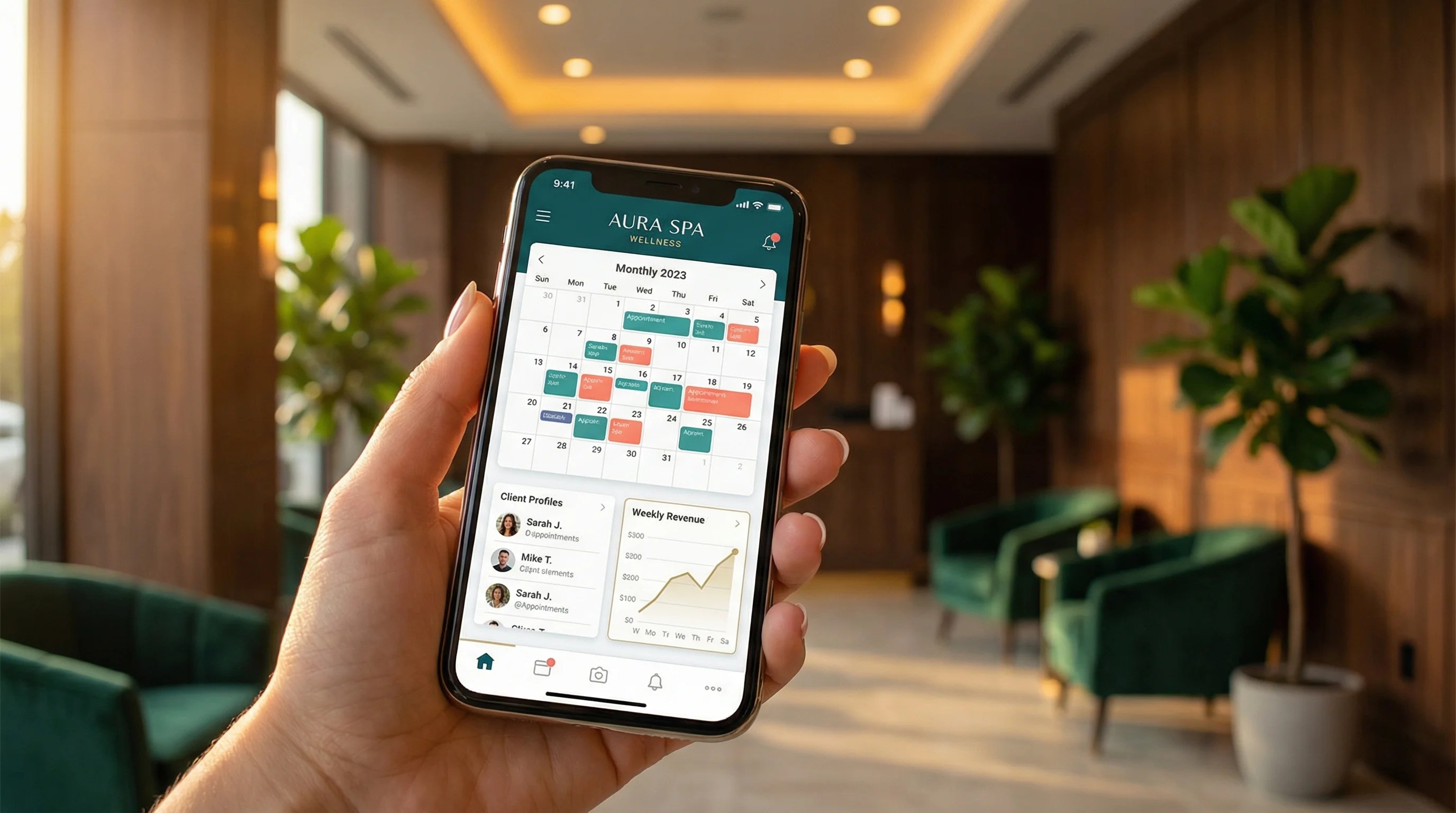
Open the WellDesk mobile app, and you’re immediately greeted with a comprehensive dashboard that shows everything you need to know about your business in real-time.
Key dashboard features include:
- Today’s schedule overview with upcoming appointments highlighted
- Real-time booking notifications as they happen
- Revenue tracking showing daily, weekly, and monthly totals
- Staff availability at a glance
- Pending tasks that need your attention
- Quick action buttons for common tasks
The dashboard is fully customizable, so you can prioritize the metrics and information most relevant to your practice. Spa owners might focus on retail sales and package usage, while massage therapists might prioritize practitioner utilization rates.
Push Notifications: Never Miss What Matters
One of the most powerful features of the WellDesk mobile app is its intelligent notification system. You’ll receive instant push notifications for important events, keeping you connected without needing to constantly check the app.
Customizable Notification Types
- New bookings from online scheduling or front desk
- Cancellations and reschedules with automatic gap-filling suggestions
- Client messages through the integrated messaging system
- Payment confirmations for both in-person and online transactions
- Low inventory alerts for retail products or treatment supplies
- Staff clock-in/clock-out for time tracking
- Review requests completed by clients
The notification settings are granular, meaning you can choose exactly what alerts you want and when. Set quiet hours for your personal time, and customize different notification preferences for weekdays versus weekends.
Schedule Management On the Go
Your calendar is the heartbeat of your practice, and the WellDesk mobile app gives you complete control over it from anywhere.
Mobile Scheduling Capabilities
View and navigate through day, week, or month calendar views with smooth touch gestures. Color-coded appointments help you quickly distinguish between services, practitioners, and booking statuses.
Book new appointments directly from your phone. Search for client profiles, check practitioner availability, select services, and confirm bookings in seconds—all without returning to your desk.
Modify existing appointments with drag-and-drop simplicity. Reschedule appointments by holding and moving them to new time slots, with automatic conflict detection.
Manage cancellations and send automated rebooking reminders to fill gaps in your schedule. The app suggests the best clients to contact based on their booking history and preferences.
Block time for breaks or administrative tasks with a few taps, ensuring your practitioners aren’t overbooked.
Client Communication Made Simple
Strong client relationships are built on responsive communication. The WellDesk mobile app includes a built-in messaging system that connects you directly with your clients.
Messaging Features
- Two-way texting with clients who opt in
- Automated appointment reminders with customizable timing
- Pre-appointment instructions sent automatically based on service type
- Post-visit follow-ups to gather feedback and encourage rebooking
- Message templates for common responses
- Conversation history linked to client profiles
All messages are tracked in the client’s profile, creating a complete communication history that any team member can access. This ensures continuity of care even when different staff members interact with the same client.
Staff Coordination Tools
Managing a team becomes significantly easier when everyone has mobile access to the information they need.
Team Features
Staff schedules are accessible to team members based on permission levels. Practitioners can view their own schedules, request time off, and swap shifts with colleagues—all from the mobile app.
Internal notes can be added to appointments, visible only to staff. This is perfect for flagging special client preferences, allergy information, or preparation requirements for specific services.
Commission tracking is visible in real-time, helping motivated team members see their progress throughout the day.
Task assignments can be created and completed from the mobile app, ensuring important duties don’t fall through the cracks during busy days.
Quick Booking for Walk-Ins
The mobile app shines during unexpected situations. When a potential client calls or walks in asking about immediate availability, you can check schedules and book them in seconds—even if you’re not at the front desk.
The quick booking flow streamlines the process:
- Search for or create the client profile
- Select the requested service
- View available practitioners and time slots
- Confirm the booking
- Send automatic confirmation to the client
This speed and efficiency improve the client experience and help you capture business that might otherwise be lost due to delayed responses.
Revenue Tracking and Business Insights
Understanding your business performance shouldn’t require end-of-day reports. The WellDesk mobile app provides real-time revenue tracking and key performance indicators.
Financial Features
- Daily revenue totals updated as payments are processed
- Service breakdown showing which treatments generate the most income
- Retail sales tracking separate from service revenue
- Package and membership revenue for recurring income visibility
- Payment method distribution showing cash, card, and digital payments
- Comparison metrics against previous periods
These insights help you make informed decisions quickly. Notice that Thursday mornings are consistently slow? You can create a limited-time promotion while the data is fresh, rather than waiting for a weekly review meeting.
Offline Capabilities for Uninterrupted Service
Internet connectivity isn’t always reliable, especially in treatment rooms with thick walls or in areas with spotty service. The WellDesk mobile app includes offline capabilities to ensure you can access critical information regardless of connectivity.
Offline Features
- View the day’s schedule and appointment details
- Access client profiles and service history
- Review notes from previous appointments
- Record service completion for billing later
When your device reconnects to the internet, all changes sync automatically. The app intelligently handles conflicts if multiple team members made changes while offline, ensuring no data is lost.
Security and Privacy
Mobile access to business data requires robust security measures. The WellDesk mobile app includes enterprise-grade security features to protect your practice and client information.
- Biometric authentication using fingerprint or face recognition
- Automatic session timeouts after periods of inactivity
- Encrypted data transmission for all information
- Role-based access controls limiting what team members can view
- Audit logs tracking all actions taken within the app
These security layers protect client privacy and comply with healthcare data regulations, giving you peace of mind when managing sensitive information on mobile devices.
Getting Started with the WellDesk Mobile App
The WellDesk mobile app is included with all WellDesk subscription plans—no additional cost or upgrade required. Simply download it from the Apple App Store or Google Play Store, log in with your WellDesk credentials, and you’re ready to manage your practice on the go.
Setup Tips
- Enable push notifications during initial setup to stay informed
- Customize your dashboard to show your most-used features
- Set notification preferences based on your schedule and role
- Add the app to your home screen for quick access
- Enable biometric login for secure but convenient access
The Future of Mobile Practice Management
The WellDesk mobile app represents more than convenience—it’s a fundamental shift in how wellness practices operate. By untethering practice management from the front desk, you gain the flexibility to provide exceptional service while maintaining work-life balance.
Whether you’re confirming tomorrow’s schedule before bed, responding to a client inquiry during lunch, or checking revenue while waiting for an appointment, the WellDesk mobile app ensures your practice is never more than a tap away.
Ready to take your practice mobile? Download the WellDesk app today and experience the freedom of managing your wellness business from anywhere. Your practice, your pocket, your peace of mind.