A pricing tier is a duration and a price for a service. Every service needs at least one, because the tier — not the service — is what a customer books.
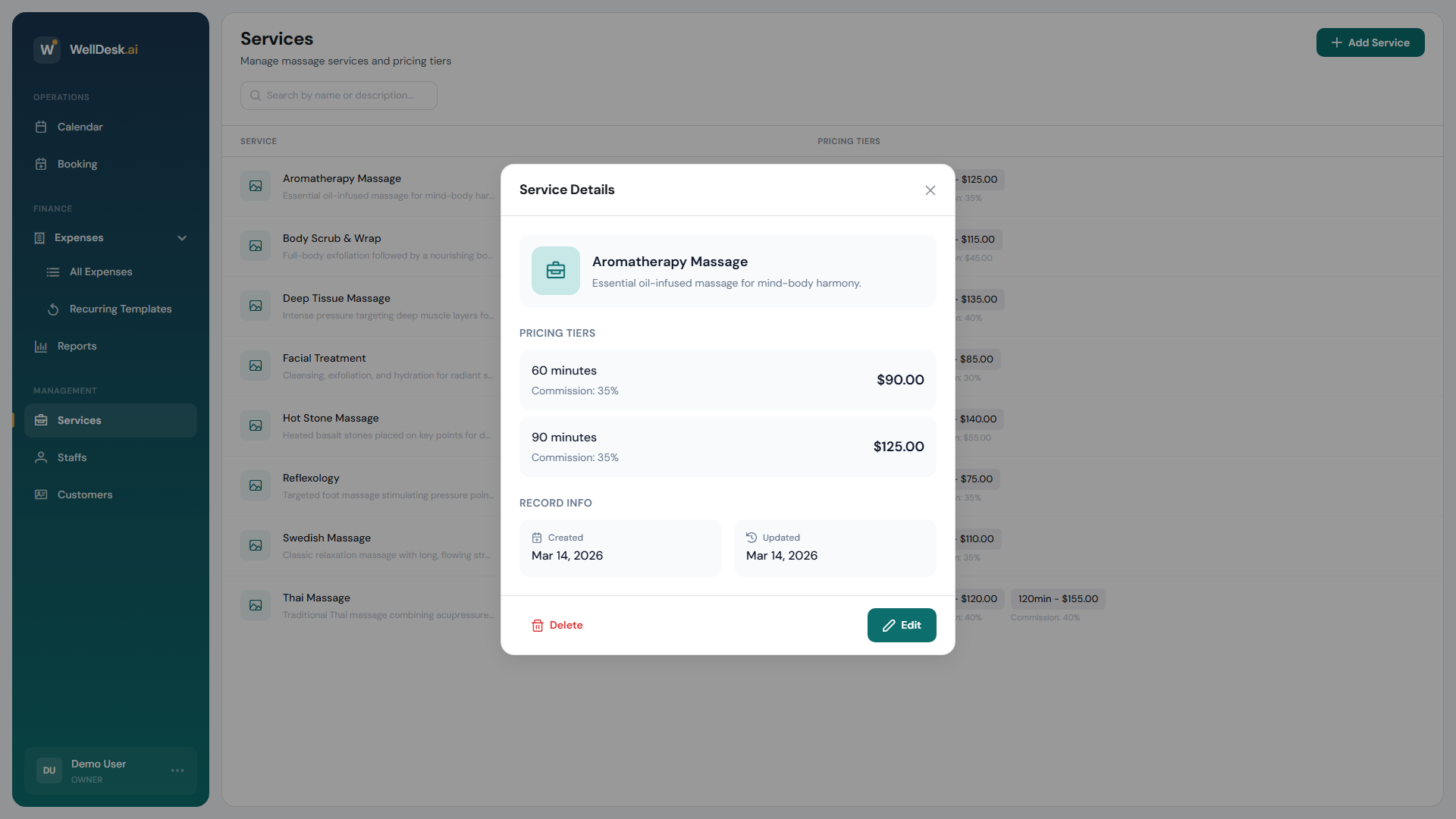
When you need more than one
- Different lengths of the same treatment — 60 minutes at €55, 90 minutes at €75. This is what tiers are for.
- A short taster version of something you normally sell long.
If two options differ by anything other than length and price — a different room, a different therapist, a different treatment — make them separate services instead. Tiers cannot express that.
Adding a tier
Tiers live in the same dialog whether you are creating a service or editing one:
- Open Services and click the service, or start a new one.
- Under Pricing Tiers, click Add Tier.
- Set Duration (minutes) — 15 to 300.
- Set Price.
- Click Save Changes.
Tiers are listed as Tier 1, Tier 2 and so on. To delete one, click Remove tier.
There is no label field: a customer sees the duration and the price, so “60 min · €55” is what communicates. Name the service well and the tiers explain themselves.
Commission
This is the part most people expect to find elsewhere: commission is set per pricing tier, not per team member.
Two people performing the same 60-minute massage earn the same commission. If you need to pay them differently, that is not something tiers can do.
With commissions turned on, each tier gets:
| Field | Meaning |
|---|---|
| Commission Type | Fixed Amount or Percentage (%) |
| Commission | The amount, or the percentage of the tier’s price |
If the fields are missing, commissions are switched off for the shop. The dialog links you to Shop Settings → Commissions to turn them on.
Because commission sits on the tier, a 90-minute tier can pay more than the 60 — either as a bigger fixed amount, or automatically if you use a percentage.
Changing a tier’s commission affects future bookings. Work already completed keeps what it earned, so a rate change does not rewrite last month’s report.
What tiers cannot do
- No deposit per tier. Deposits belong to online payments, which are not switched on. See Payment Settings.
- No reordering. Tiers appear in the order they were created.
- No different price per team member. Commission varies by tier only, and the price is the price.
Tips
- Two tiers beat four. Most shops sell a standard length and a longer one; more than that makes people hesitate rather than choose.
- Percentage commission scales itself. Set it once and a price rise carries through without you editing every tier.
- Check the price after adding a tier. A tier saved at the wrong duration is bookable immediately.