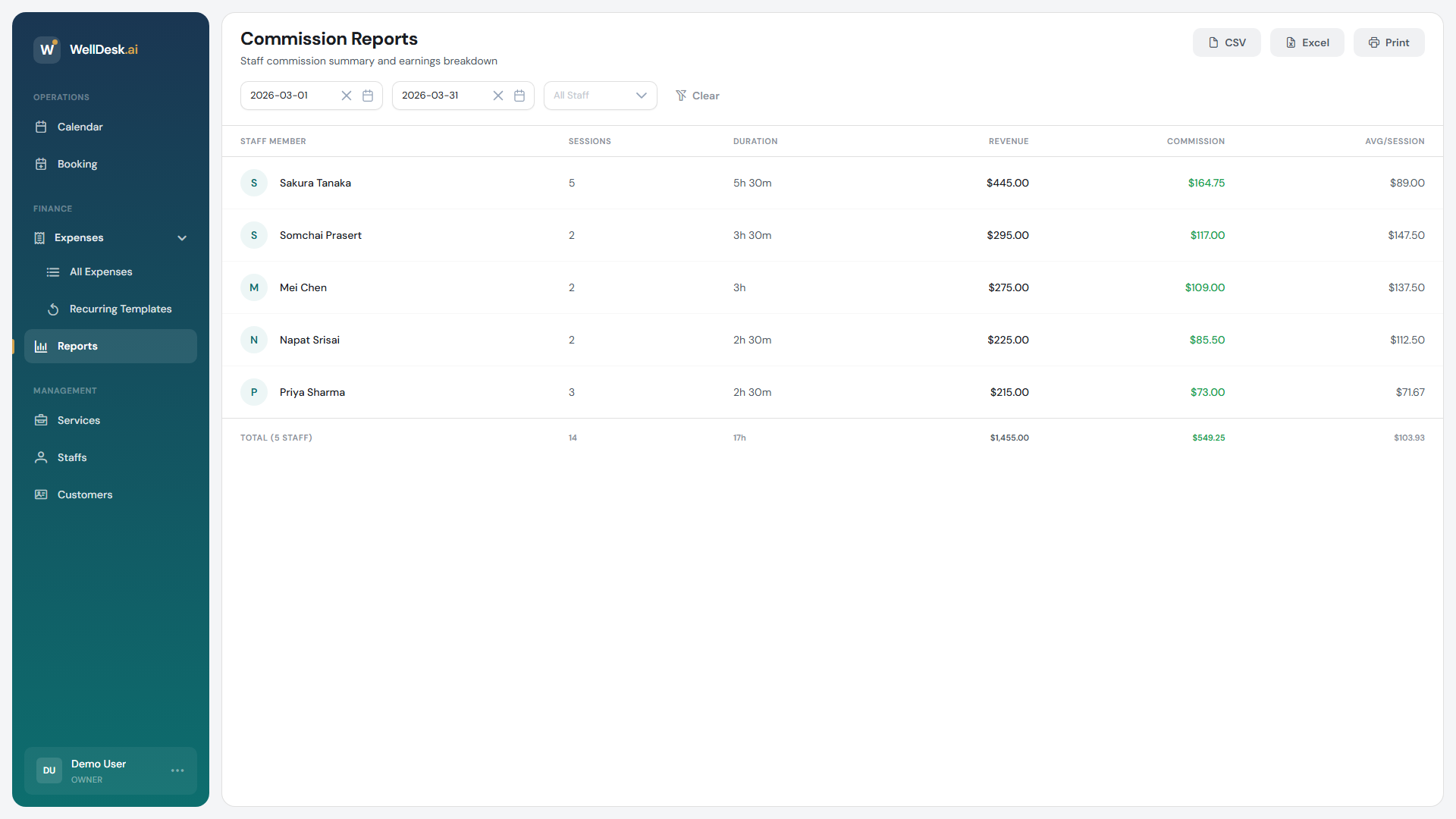
The commission report totals what each team member earned over a period, based on the appointments they completed.
Before it will show anything
Two things have to be true:
- Commissions are switched on for the shop, and the pricing tiers have commission values. Note that commission is set per pricing tier, not per person — see Pricing Tiers.
- The appointments are marked Completed. Nothing else counts. See Managing Booking Status.
An empty report almost always means bookings were never completed, not that the commission is misconfigured.
Running a report
- Go to Earnings in the sidebar — the page itself is headed Commission Reports.
- Set a Start Date and End Date.
- Optionally narrow to one person instead of All Staff.
The report updates for the range you picked. Clear resets it.
Reading it
One row per team member:
| Column | Meaning |
|---|---|
| Staff Member | Who performed the work |
| Sessions | Completed appointments in the period |
| Duration | Total time worked across them |
| Revenue | What those appointments brought in, net of discounts |
| Commission | What they earned |
| Avg/Session | Revenue divided by sessions |
The footer totals everyone, and shows Discounts given for the period — useful for seeing what a promotion actually cost you.
Revenue is net, so a discounted booking contributes what the customer paid, not the list price.
One person’s detail
Click a row to open Staff Commission Details:
- Service Breakdown — sessions, duration, revenue and commission per service, so you can see what someone’s earnings are actually made of.
- Payment Methods — how their customers paid, split by type.
Exporting
Three buttons: CSV, Excel and Print.
CSV suits payroll software and spreadsheets; Excel gives you a formatted workbook; Print produces a copy you can hand to someone. Whatever range and filter is on screen is what exports.
Tips
- Complete bookings the same day. The report is only ever as good as the statuses behind it.
- Use consistent ranges. If you pay monthly, run first-to-last of the month every time — overlapping ranges double-count and gaps lose someone a session.
- Send each person their own detail. It answers “how was this worked out?” before it is asked.
- Watch the discounts total. A month where commission looks healthy but revenue does not is usually a discount that was more generous than intended.